
Notifications
Clear all

This one started as “I am tired of crawling behind the desk to flip DIP switches,” and then it grew a life of its own. Same story as the rest of the CMD IEC Utilities pile: it began as a partition backup and refused to stay in its lane.
DEVSW++ 1.2-0188 is up as a beta standalone download. Here is the program disk plus the handbook (The Bus Conductor’s Handbook). Same module also lives as item 6 on CMDBACK when it is released.
What it does, in plain language:
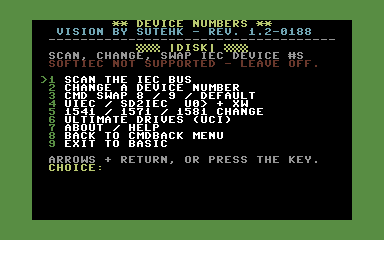
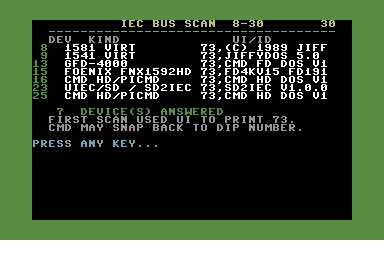
It walks the IEC bus from 8 to 30, tries to name whatever answers, and lets you change that unit’s device number from the keyboard. CMD HD / piCMD, CMD FD and the GFD / Foenix replicas, RAMLink, uIEC/SD and sd2iec, 1541 / 1571 / 1581, and Ultimate virtual Drive A / Drive B through UCI. Software SWAP on a CMD drive (S-8, S-9, S-D) matches the front-panel button. There is also a T-swap that parks one drive, moves the other, then finishes — for two units that do not have a SWAP button. uIEC can take U0> for now or XW if you want it to wake up on that number after power-off. Menu 9 dumps you back to BASIC and NEWs itself so the 64 is free; the numbers you set stay on the drives.
Green border on purpose. That is how you know you are not in the copier or the clock.
This is a beta because an IEC bus with mixed CMD, uIEC, Ultimate virt, and a piCMD does not behave the same twice, and I cannot own every combination. I need reports from people whose pile is different from mine.
Please try it and tell me what does not work. Useful reports look like this:
- what is actually on the bus (device numbers and kinds)
- first scan vs a second scan in the same run
- which command you sent (change, S-8 / S-9 / S-D, T-swap, uIEC XW, Ultimate power)
- what the activity lights did
- whether a later scan still showed the swap
- freeze, hang, wrong name, wrong number, or “it worked and then UI put the HD back on 12”
Known manners, so you do not file those as surprises:
- SoftIEC is not supported. Leave it off or the scan can sit there waiting for a status byte that never comes.
- The first scan after you enter the module sends UI so the 73 banners reprint. That is the useful roll call. UI on a CMD HD/FD/RL can snap that unit back to its DIP or configured default. Scan first, swap second.
- Later scans in the same run do not send UI. CMD identification is M-R $FEA0 plus whatever 73 text was cached.
- An FD’s home address is still DIP 8–15. You can visit 16–30 until reset. You cannot make 20 the default with software.
- Ultimate F2 still owns the configured virt bus ID. CMD SWAP-8 can still park a virt on 12 anyway — the bus is louder than F2.
- Two devices cannot share a number. The program will refuse.
JiffyDOS friendly. UCI has to be on if you want menu 6 to see Drive A/B. Use a SuperCPU or Turbo at least at 12mhz or the listing can be slow.
If it works on your mess of a bus, say that too — “HD 12, virt 8→12 after S-8, uIEC 10 XW to 20, scan matched the lights” is gold. If it lies, believe the activity light and tell me which sentence on the screen was the liar.
Download is the 1.2-0188 zip (D64 + handbook). On-screen rev should read 1.2-0188. If it does not, you grabbed the wrong disk.
Comments, broken cases, and “why does device 25 do that” all welcome.
-Sutehk
File link: https://8bitboyz.com/download/device-numbers-list-swap-switch-beta-v-1-2-01 88/
Topic starter
Posted : 22/09/2026 6:45 pm
Hans reacted

Mater artium necessitas
Source: removed link
Posted : 22/09/2026 7:37 pm