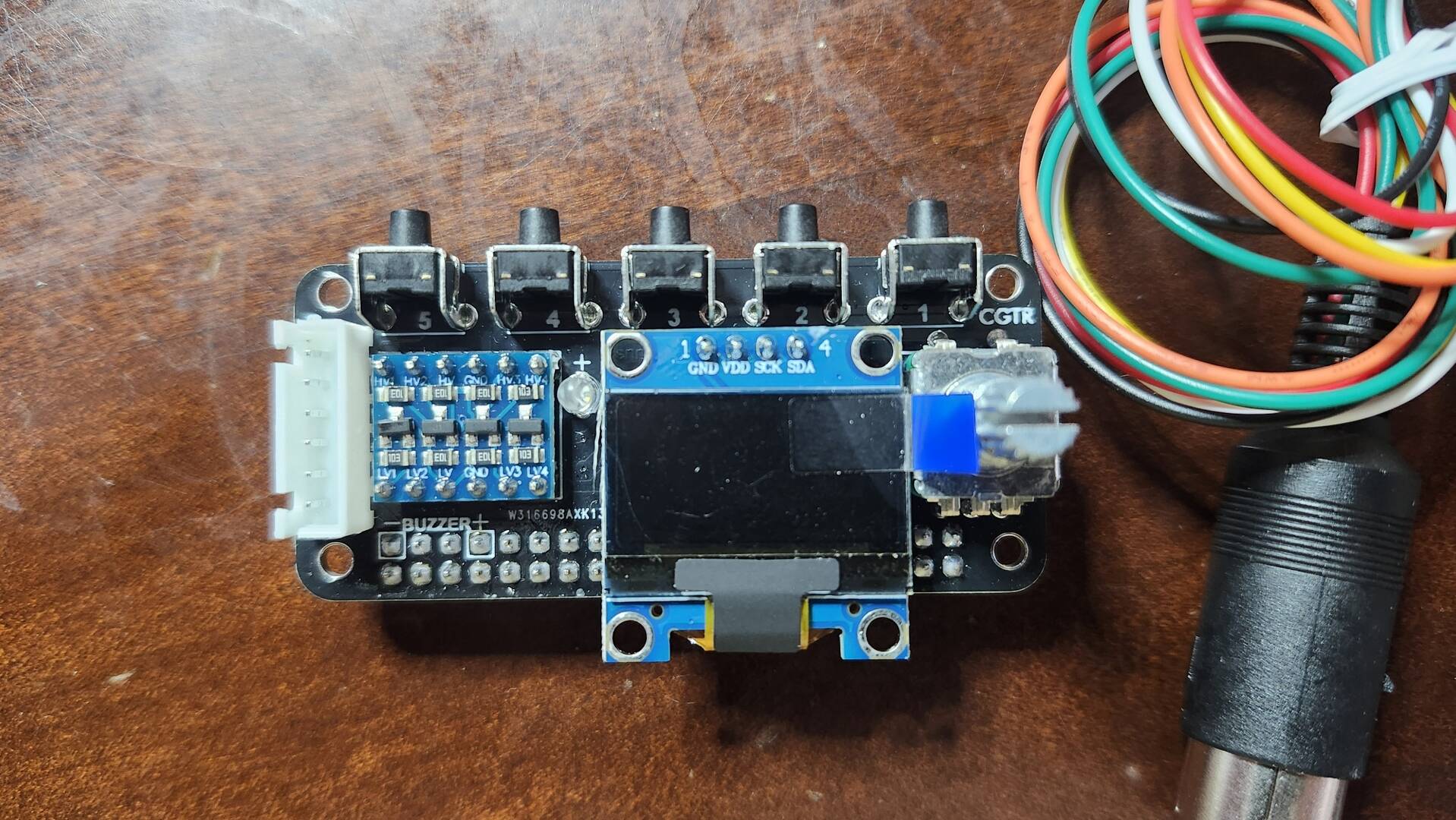
Still can't get it to work with my Pi1541! Wasted Money I am starting to think... 🙁 Hope he comes out with an update soon...
Bucko
Wrong Number Family of BBS'
Website: www.wrgnbr.com
Wrong Number ][ BBS - wn2.wrgnbr.com:23 (Mystic BBS)
Wrong Number ]I[ BBS - wn3.wrgnbr.com:6400 (CNet Amiga BBS)
Wrong Number IV BBS - wn4.wrgnbr.com:3000 (Image BBS v3.0)
Wrong Number VI BBS - wn6.wrgnbr.com:6411 (ORIGINAL Wrong Number ][ Retro 1993 BBS)
The Time Warp BBS - (Centipede 128 Dual Line BBS)
twb.wrgnbr.com:6896 - Auto roll down to Line 2 if Line 1 is Busy.
Bucko's Den BBS - bdn.wrgnbr.com:6800 (Excelsior! BBS For the Amiga) 1 of only 3 known Excelsiors!!
Well considering the guy doing the piCMD does it as a hobby doesn't get paid and doesn’t charge for it. I’m not sure how it is a waste if money…..
But if you follow the github and set things up correctly I believe it works well. I have three of them going and I know others are running them too. I’d double-check that you followed the directions exactly.
Good Luck and I hope you get it running. It’s a great project!
Well considering the guy doing the piCMD does it as a hobby doesn't get paid and doesn’t charge for it. I’m not sure how it is a waste if money…..
But if you follow the github and set things up correctly I believe it works well. I have three of them going and I know others are running them too. I’d double-check that you followed the directions exactly.
Good Luck and I hope you get it running. It’s a great project!
-Sutehk
Bucko is doing it all correctly, the issue is the HAT. Bucko & I picked up some HATs that are suppose to be rev 4/5 compatible but it is designed for a piZero. Xlar worked with me a month ago for a while and could not get it going as it is something in the physical HAT. After that Xlar ordered the HAT also and is going to work on a fix for this very HAT, he should have his in by now but he is also tied up with 3 other projects some of which are not even released and under secret development still. Im sure he will get it though.
Commodore 64 BBS -=[ commodore64bbs.com:6464 ]=- ....1st Commodore 64 Ultimate to run Image BBS 3.0!
The Kats Alley BBS -=[ tka.8bitboyz.com:6400 ]=- ....Running Image 3.0 for the C64
8-Bit Boyz BBS -=[ bbs.8bitboyz.com:6502 ]=- ....Running Mystic on Windows
Best Retro Web Resource -=[ www.8bitboyz.com ]=- ....Running a whole lotta PHP, Javascript, SQL and so much more!
Well considering the guy doing the piCMD does it as a hobby doesn't get paid and doesn’t charge for it. I’m not sure how it is a waste if money…..
But if you follow the github and set things up correctly I believe it works well. I have three of them going and I know others are running them too. I’d double-check that you followed the directions exactly.
Good Luck and I hope you get it running. It’s a great project!
-Sutehk
I am not knocking Scott, I completely understand that this is only a hobby for him. I am upset that I blew $100 on an outdated Pi3b+ and a Pi1541 that is supposed to work with the software but doesn't. It does work with the pi1541 software, which although is useless to me is a good sign that this can run eventually. It is coming down to startelf and kernel file...
Bucko
Wrong Number Family of BBS'
Website: www.wrgnbr.com
Wrong Number ][ BBS - wn2.wrgnbr.com:23 (Mystic BBS)
Wrong Number ]I[ BBS - wn3.wrgnbr.com:6400 (CNet Amiga BBS)
Wrong Number IV BBS - wn4.wrgnbr.com:3000 (Image BBS v3.0)
Wrong Number VI BBS - wn6.wrgnbr.com:6411 (ORIGINAL Wrong Number ][ Retro 1993 BBS)
The Time Warp BBS - (Centipede 128 Dual Line BBS)
twb.wrgnbr.com:6896 - Auto roll down to Line 2 if Line 1 is Busy.
Bucko's Den BBS - bdn.wrgnbr.com:6800 (Excelsior! BBS For the Amiga) 1 of only 3 known Excelsiors!!
I successfully got it running on a Raspberry Pi 3A+.
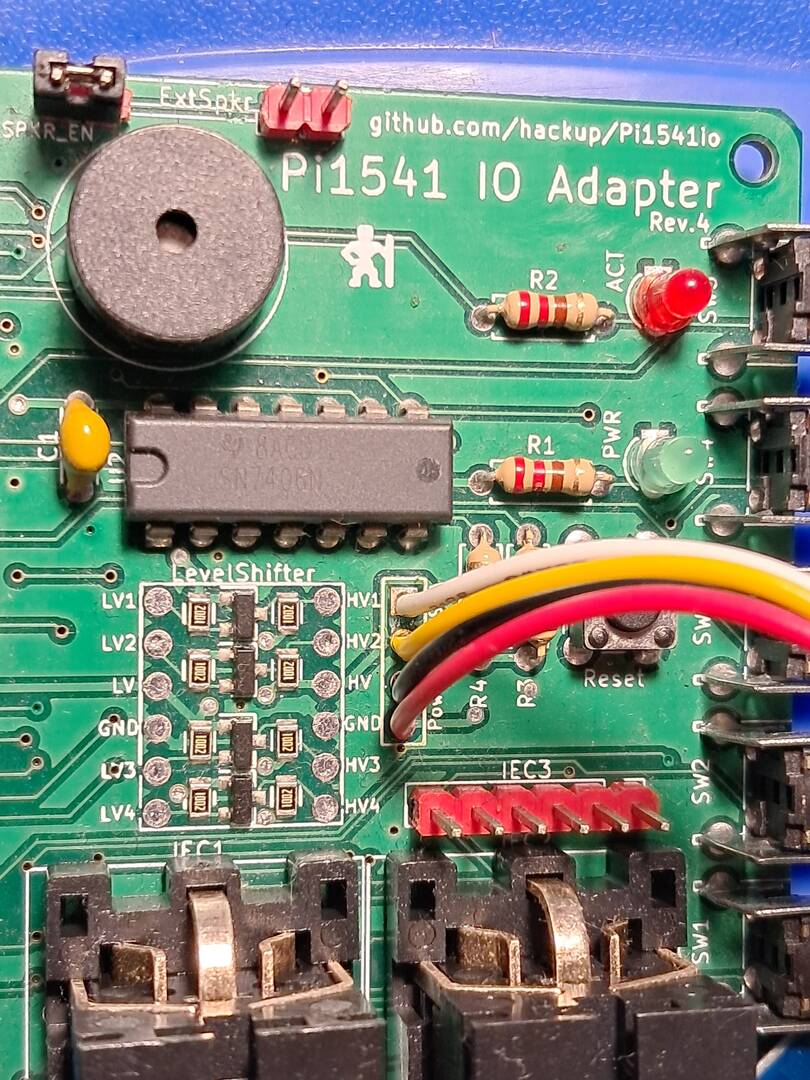
HAT rev 4 (hackup).
With a 7406 chip. Fan-cooled.
LCD sh1106_128x64.
ATN Swap works.
If anyone is having trouble with the same setup, I can share the configuration files.
I think my issue is with the hat itself, no one in the states is selling a hat that is compatible.. Only overseas and I will not pay Orangeman's import fees for something I am only going to use to test software I create to make sure it runs on real hardware. If you would like to attach the config files that would be great I can give them a try and see how it works out.. Or email me if you get the change at bucko@wrgnbr.com..
Thanks...
Bucko
Wrong Number Family of BBS'
Website: www.wrgnbr.com
Wrong Number ][ BBS - wn2.wrgnbr.com:23 (Mystic BBS)
Wrong Number ]I[ BBS - wn3.wrgnbr.com:6400 (CNet Amiga BBS)
Wrong Number IV BBS - wn4.wrgnbr.com:3000 (Image BBS v3.0)
Wrong Number VI BBS - wn6.wrgnbr.com:6411 (ORIGINAL Wrong Number ][ Retro 1993 BBS)
The Time Warp BBS - (Centipede 128 Dual Line BBS)
twb.wrgnbr.com:6896 - Auto roll down to Line 2 if Line 1 is Busy.
Bucko's Den BBS - bdn.wrgnbr.com:6800 (Excelsior! BBS For the Amiga) 1 of only 3 known Excelsiors!!
Post clear photos of both sides of your HAT. Do you have the 7406 or the 7407 chip? Also, upload the `options.txt` file you've been using for the pi1541 emulation so far. I'll be home this evening and will upload my settings then.
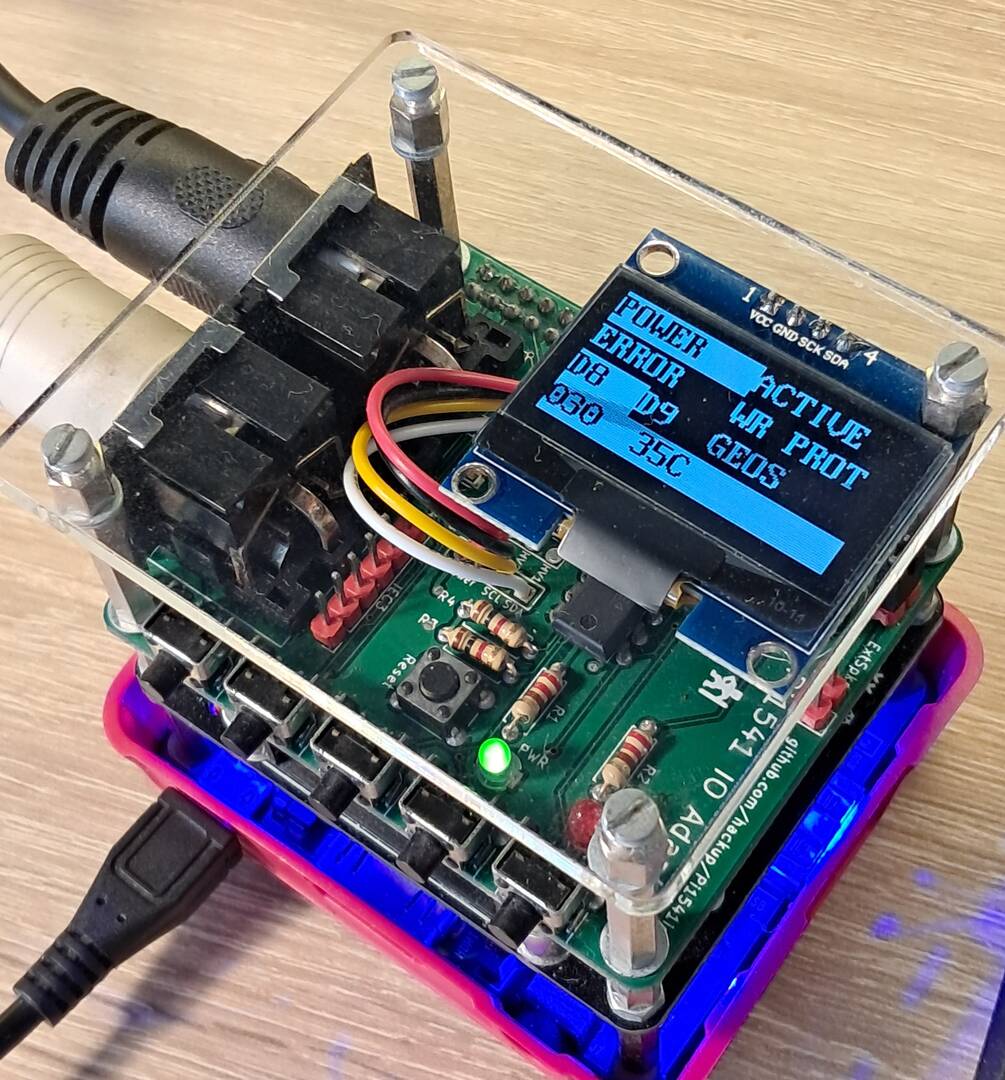
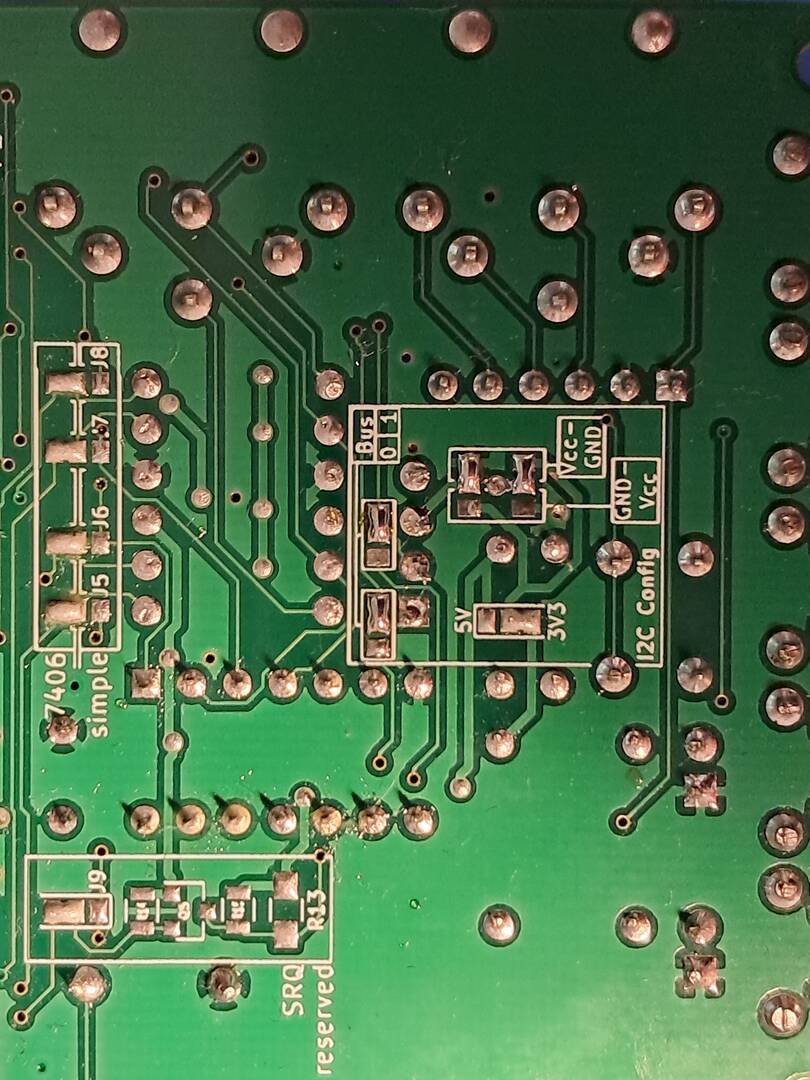
options.txt The options work with HAT rev4 (hackup), 7406 ("Option B"), and the sh1106_128x64 LCD. See the board photo for HAT rev4 jumper (solder) settings.
For other HATs: For safety, disable this setting by commenting it out: `//CMDHDAtnOutGPIO = 24`
// options.txt for Pi-CMD (CMD HD emulator) on a Raspberry Pi 3B/3B+ with
// hackup's Pi1541io rev 4 interface board and an I2C OLED.
// Board:  https://github.com/hackup/Pi1541io
//
// Put this file in the ROOT of the SD card. Uncommented lines are the working
// configuration for that hardware; everything commented out shows the default.
// This lists every option the emulator understands - anything not here is not
// read.

// ---------------------------------------------------------------------------
// Hardware interface
// ---------------------------------------------------------------------------

// Pi1541io is split line ("Option B") hardware.
splitIECLines = 1

// Leave these commented unless your board needs inversion.
// The default suits a 7406; use invertIECOutputs = 0 for a 7407.
//invertIECInputs = 1
//invertIECOutputs = 0

// GPIO used to pull the IEC ATN line low, so the drive can take control of the
// bus and reprogram whichever drive currently owns device 8 or 9 when you press
// SWAP. On a Pi1541io the ATN line reaches the Pi through a BSS138
// bidirectional level shifter, so the pin that reads ATN can drive it too.
// 0 disables it (the HD then still changes its own device number, it just
// cannot move another drive out of the way).
CMDHDAtnOutGPIO = 24

// ---------------------------------------------------------------------------
// CMD HD
// ---------------------------------------------------------------------------

// The boot ROM is found automatically if it is named cmdhd-bootrom.bin in the
// root of the card. Override the name here if you want to.
//CMDHDRomName = cmdhd-bootrom.bin

// The drive's device number lives inside the image (set it with CMD's
// HD-TOOLS in configuration mode). Setting this forces a different
// number by patching the configuration block on the fly. 0 = respect the image.
//CMDHDDeviceID = 0

// Size in MB of the RAM cache in front of the DHD image.
//CMDHDCacheMB = 32

// Front panel buttons. The real CMD HD has four: SWAP 8, SWAP 9,
// WRITE PROTECT and RESET. Button 5 exits emulation (not a CMD HD function).
// Set any to 0 to disable it.
//CMDHDButtonSwap8 = 1
//CMDHDButtonSwap9 = 2
//CMDHDButtonWP = 3
//CMDHDButtonReset = 4
//CMDHDButtonExit = 5

// Mount this image at startup, so the drive comes straight up as a hard drive.
// The file must be in the /cmd-images folder.
AutoMountImage = hd0.dhd

// ---------------------------------------------------------------------------
// I2C OLED / LCD
// ---------------------------------------------------------------------------

// Uncomment the ONE that matches your panel.
//LCDName = ssd1306_128x64
//LCDName = ssd1306_128x32
LCDName = sh1106_128x64

// I2C address in DECIMAL: 60 = 0x3C (most common), 61 = 0x3D
i2cLcdAddress = 60

// Which I2C bus. On a Pi1541io rev 4 the solder bridges select this:
// 1 = GPIO2/GPIO3 (default) 0 = GPIO0/GPIO1
i2cBusMaster = 1

// Rotate 180 degrees if the panel is mounted upside down.
//i2cLcdFlip = 1

// Brightness while active, and while dimmed (0-255).
//i2cLcdOnContrast = 127
//i2cLcdDimContrast = 0

// Seconds of inactivity before dimming. 0 never dims.
//i2cLcdDimTime = 0

// Use the 8 pixel CBM font: 8 text rows instead of 4 (needs ChargenFont set).
//i2cLcdUseCBMChar = 1

// Show the CMD HD's front panel lamps on the LCD:
// POWER ACTIVE / ERROR WR PROT / DRIVE 8 DRIVE 9
// The panel is monochrome, so a lit lamp is drawn as an inverse video block.
CMDHDLcdLamps = 1

// Splash image on the LCD at boot: 1541ii, 1541classic, or a PNG on the card.
//LCDLogoName = 1541ii

// Scan the I2C bus at boot and list the addresses found, on the HDMI screen.
// Only needed while getting a display working.
//i2cScan = 1

// ---------------------------------------------------------------------------
// HDMI screen
// ---------------------------------------------------------------------------

// Show IEC bus activity along the bottom of the screen.
GraphIEC = 0

//ScreenWidth = 1024
//ScreenHeight = 768

// Commodore character ROM used for the CBM font, if you have one.
//ChargenFont = chargen

// Show PNG icons beside file names in the browser.
//DisplayPNGIcons = 1

// Show the Pi's CPU temperature. Around 52C is normal; over 65C means
// something is wrong with your cooling.
DisplayTemperature = 1

// Print the parsed options at boot. Useful when a setting seems ignored.
//ShowOptions = 1

// ---------------------------------------------------------------------------
// Browser and misc
// ---------------------------------------------------------------------------

// Go back to the starting folder when the computer resets.
OnResetChangeToStartingFolder = 1

// Scroll speed for long filenames.
scrollHighlightRate = 0.07

// Buttons used to navigate the file browser (1-5). These are separate from the
// CMD HD front panel buttons above, which apply while emulating.
//buttonEnter = 1
//buttonUp = 2
//buttonDown = 3
//buttonBack = 4
//buttonInsert = 5

// Let a USB keyboard drive the LCD rather than the HDMI screen.
//KeyboardBrowseLCDScreen = 1

// Ignore the computer's reset line.
//IgnoreReset = 1

// Skip the startup delay.
QuickBoot = 1

// Accept input over the serial UART.
//supportUARTInput = 1
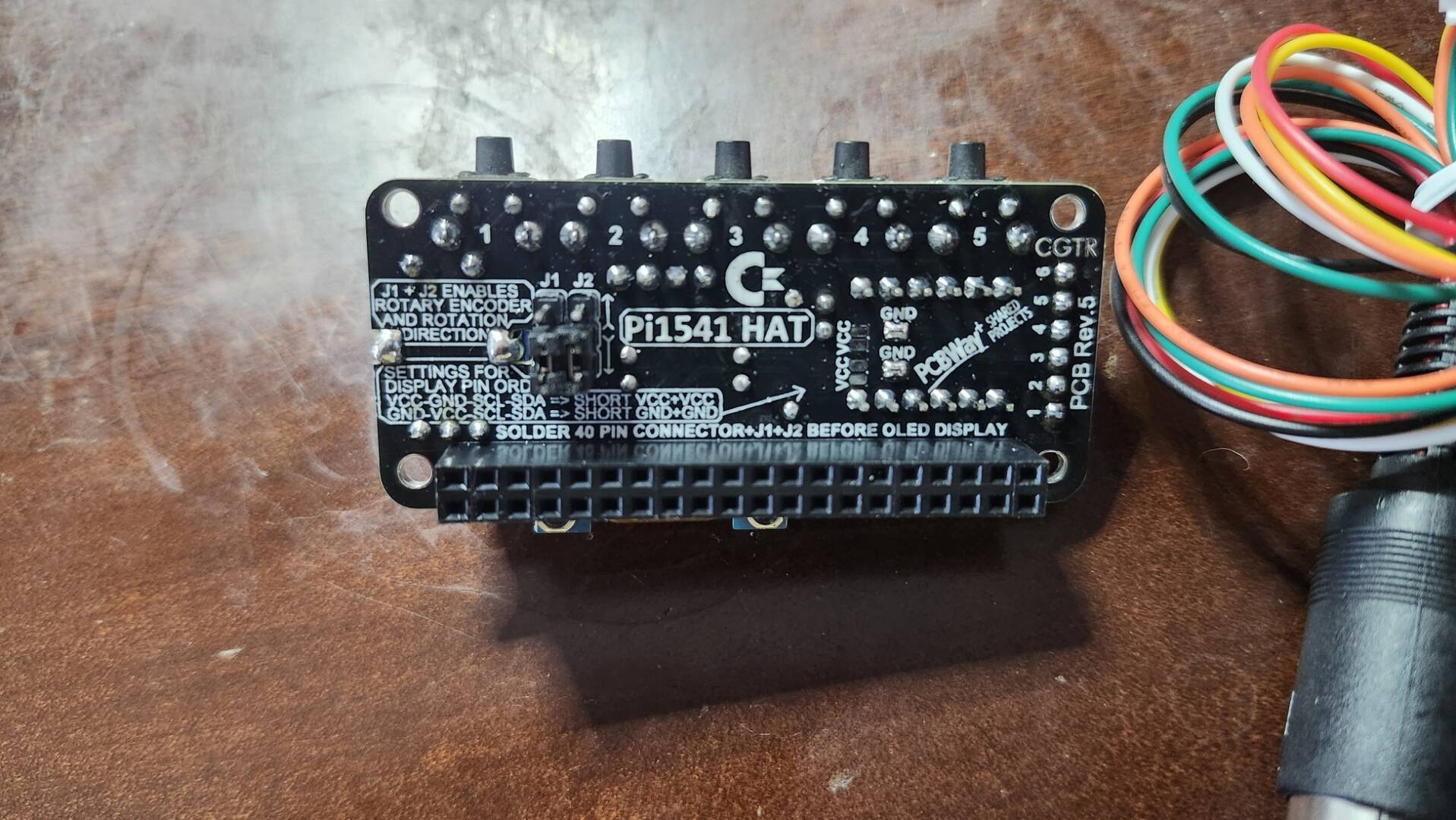
@radius75 I have the same hat as @bucko that does not work, here are some photos of it.
I also have rev4 hats working no issue with pi3A & pi3B's. I have had zero issues with those hats as they are the white rev4 exactly like what Scott is using. Been running them since the day he released it. Commodore64BBS.com:6464 is running on one of them for over 6 weeks now.
The HAT in my photos I worked with Scott trying to get it to go but he was stumpped at the time. I know he order one to have in hand to figure out what is wrong.
So far everything else shared here is just text book and been done to begin with. And having the rev 4 board, well thats what scott coded this on/for so its turn key other than putting your few files in the right place. This HAT Bucko is refering to is not even putting out HDMI, that was the first thing Scott tried to get working in facetime with me on mine a few weeks back. He will figure it out, just needs time.
Commodore 64 BBS -=[ commodore64bbs.com:6464 ]=- ....1st Commodore 64 Ultimate to run Image BBS 3.0!
The Kats Alley BBS -=[ tka.8bitboyz.com:6400 ]=- ....Running Image 3.0 for the C64
8-Bit Boyz BBS -=[ bbs.8bitboyz.com:6502 ]=- ....Running Mystic on Windows
Best Retro Web Resource -=[ www.8bitboyz.com ]=- ....Running a whole lotta PHP, Javascript, SQL and so much more!
Your HAT doesn't seem to have the 740x chip; I don't see it. So, this is the cheaper HAT "Option A." The config file from xlar54's package won't work with this option. That’s why I asked you to paste the options.txt file that works with the pi1541 emulation, so I could compare them.
@radius75 Exactly. Thus waiting on his work around.
Commodore 64 BBS -=[ commodore64bbs.com:6464 ]=- ....1st Commodore 64 Ultimate to run Image BBS 3.0!
The Kats Alley BBS -=[ tka.8bitboyz.com:6400 ]=- ....Running Image 3.0 for the C64
8-Bit Boyz BBS -=[ bbs.8bitboyz.com:6502 ]=- ....Running Mystic on Windows
Best Retro Web Resource -=[ www.8bitboyz.com ]=- ....Running a whole lotta PHP, Javascript, SQL and so much more!